Imagine reaching a toll plaza and discovering that your FASTag does not have enough balance. Instead of passing through smoothly, you may have to deal with a payment issue or delay.
A simple way to avoid this situation is to check your FASTag balance before starting your journey. Whether you are travelling by car, managing a commercial vehicle, or operating a fleet, knowing your available balance can help you plan your toll payments better.
There are several ways to check the amount available in your FASTag account. Depending on your issuing bank and the services available to you, you can use an online portal, vehicle details, SMS alerts, a mobile application, or an authorized FASTag service.
In this guide, we explain five practical ways to check your FASTag balance, what to do when the amount is not updated, how to handle a negative balance, and how fleet owners can manage toll payments more efficiently.
Why Is It Important to Check Your FASTag Balance?
FASTag allows toll payments to be processed electronically when you pass through a FASTag-enabled toll plaza. The applicable toll amount is deducted from the account associated with your tag.
If there are insufficient funds, you may face problems during your journey. For someone travelling occasionally, this can be inconvenient. For a truck, bus, or commercial vehicle covering a long route, even a small payment issue can affect the trip schedule.
Checking your available balance before travelling can help you:
- Prepare for upcoming toll payments
- Know when your account needs a recharge
- Keep track of recent toll deductions
- Reduce the chances of payment-related interruptions
- Monitor expenses for frequent highway travel
- Manage multiple vehicle accounts more efficiently
For this reason, checking the available amount before a long-distance trip is a useful habit for both private vehicle owners and fleet operators.
5 Easy Ways to Check Your FASTag Balance
The exact process can vary depending on your FASTag issuing bank and the service you use. Some methods may require your registered mobile number, vehicle registration number, OTP, or account credentials.
Here are five commonly available options.
1. Check Your Balance Online
The first option is to use the official website of your FASTag issuing bank or another authorized FASTag service.
Most online portals require you to provide some account or vehicle information before displaying your FASTag details.
Steps to follow
- Visit your FASTag issuer’s official website or an authorized FASTag service.
- Select the relevant FASTag or balance enquiry option.
- Enter the required vehicle or account details.
- Complete OTP verification if requested.
- View your available balance and transaction information, if available.
Make sure that the information you enter matches your FASTag account.
If the details are incorrect, the system may not be able to identify your tag or display the correct account information.
2. Check FASTag Balance Using Your Vehicle Number
A common search among vehicle owners is FASTag balance check by vehicle number.
Some FASTag services allow users to access tag-related information using their vehicle registration number. Depending on the platform, additional verification may also be required.
How it generally works
- Open the supported balance enquiry page.
- Enter your vehicle registration number.
- Provide any other information requested.
- Complete OTP verification if required.
- Check the available information linked to your FASTag.
The availability of this option depends on the service provider.
If your vehicle number does not work, verify that you have entered it exactly as registered with your FASTag account. If the problem continues, you can contact your issuing bank for assistance.
3. Use SMS Alerts to Monitor Your Balance
SMS notifications can be a convenient way to monitor FASTag transactions.
Your FASTag issuer may send an SMS when a toll payment is processed. Depending on the issuer, the message may contain information about the transaction and the remaining amount in your account.
This means you can often keep track of your toll activity without opening an application every time.
Some banks may also offer a separate SMS-based enquiry facility. However, the number, format, and availability of this service vary between FASTag issuers.
Before using an SMS enquiry service, check the latest instructions provided by your issuing bank.
SMS alerts are particularly useful when you are travelling in an area where mobile internet connectivity is limited.
4. Use Your FASTag Mobile App
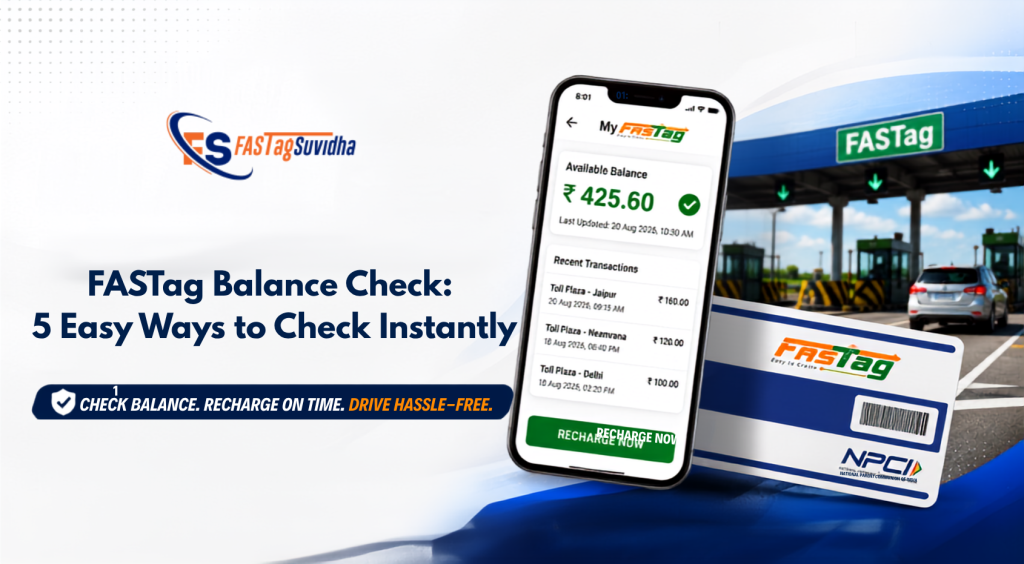
Another convenient option is the mobile application or digital service provided by your FASTag issuer.
Depending on the application and your account, you may be able to:
- View your available balance
- Check recent toll transactions
- Review recharge details
- Manage account information
- Access other FASTag services
Always use the official application or authorized platform associated with your FASTag account.
The features available through an app can differ between issuers, so follow the instructions shown within your particular service.
5. Check Your Balance Through Fastag Suvidha
If you want an online option for managing your FASTag, Fastag Suvidha provides a dedicated balance checking facility.
You can access the service here:
The service can be useful when you want to check your available amount before travelling.
If you find that your balance is low, you can also use the Fastag Suvidha recharge service.
This creates a simple routine:
Check your balance → Recharge if required → Confirm the transaction → Start your journey
For people who frequently use toll roads, this can make FASTag management more convenient.
How to Check Your Balance Before a Long Journey
A little preparation before travelling can help you avoid last-minute FASTag problems.
Before starting a long trip, follow this simple checklist:
1. Check the Available Amount
First, find out how much money is currently available in your FASTag account.
2. Review Your Route
Consider the route you are taking and the number of toll plazas you are likely to cross.
3. Estimate Your Toll Expenses
Consider the expected toll charges based on your route and vehicle category.
4. Recharge If Necessary
If the available amount is not sufficient for the planned journey, recharge before leaving.
5. Verify the Transaction
After making a recharge, check the transaction status. If the updated amount does not appear immediately, allow time for processing before making another payment.
This simple process can help you avoid discovering a low balance when you are already at a toll plaza.
What Should You Do If Your FASTag Balance Is Low?
If your available amount is low, it is better to recharge before your next toll payment rather than waiting until you reach the toll plaza.
Fastag Suvidha provides an online recharge facility:
Depending on the service available to you, online recharge may support payment options such as UPI, debit card, credit card, net banking, or other available methods.
After completing a recharge, keep your payment confirmation or transaction reference until the amount is successfully reflected in your FASTag account.
What If Your FASTag Balance Shows a Negative?
Seeing a negative amount in your account can be confusing.
A negative balance can occur when a toll transaction is processed while there are insufficient funds available in the linked account.
If this happens, do not ignore the issue.
Follow these steps:
- Check your recent toll transactions.
- Confirm that the deduction matches your recent journey.
- Recharge your FASTag if required.
- Check your account again after the transaction has been processed.
- If the issue remains, contact your FASTag issuing bank or service provider.
For FASTag-related complaints, you can also contact the NHAI helpline at 1033.
The exact reason for a negative balance can vary, so reviewing the transaction history is an important first step.
Why Is My FASTag Balance Not Updated After Recharge?
One of the common questions FASTag users have is why their account still shows the old amount after completing a recharge.
A recharge may take some time to reflect because the transaction has to be processed by the relevant payment and FASTag systems.
If your balance has not changed immediately, follow these steps:
Check the Payment Status
First, confirm whether your recharge was successful, pending, or failed.
Check Again After Some Time
Refresh your FASTag account and perform another balance enquiry.
Do Not Immediately Make Another Payment
If the first transaction is still processing, making another recharge immediately may create confusion.
Keep Your Transaction Reference
Save your:
- Transaction ID
- Recharge amount
- Date and time
- Payment confirmation
- Registered vehicle details
If your payment account has been debited but the FASTag balance remains unchanged for an extended period, contact the relevant FASTag issuer or payment provider with these details.
Common FASTag Balance Check Errors
Sometimes the balance enquiry process may return an error.
| Error | Possible Reason | What You Can Do |
| Tag not found | Vehicle or FASTag details do not match | Recheck the information you entered |
| Balance not updated | Recent transaction is still processing | Wait and check again |
| Invalid OTP | OTP expired or was entered incorrectly | Request a new OTP |
| Transaction not visible | Recent transaction has not been reflected | Check again later |
| FASTag inactive | Account or tag-related issue | Contact your FASTag issuer |
| Recharge not reflected | Payment is still processing | Check payment status and keep the transaction ID |
If the problem continues, contact your FASTag issuing bank or service provider for further assistance.
FASTag Balance Management for Commercial Vehicles
For truck owners, fleet operators, logistics companies, and transport businesses, managing FASTag balances requires a more organized approach.
Commercial vehicles often travel long distances and cross several toll plazas during one journey. A low balance can therefore create delays and make it harder for fleet managers to keep vehicles moving according to schedule.
Fleet operators can improve FASTag management by making balance monitoring part of their regular dispatch process.
A simple system could include:
- Check the balance before vehicle dispatch
- Review recent toll transactions
- Estimate toll expenses for the planned route
- Recharge when necessary
- Keep FASTag details organized for each vehicle
- Monitor multiple vehicle accounts regularly
- Use available transaction alerts and auto-recharge facilities
For example:
Vehicle scheduled for trip → Balance checked → Route reviewed → Recharge completed if required → Vehicle dispatched
This process gives fleet managers better visibility into toll-related payments.
Fastag Suvidha also provides FASTag franchise and business opportunities for people interested in FASTag-related services.
FASTag Balance Check vs FASTag Recharge
A balance enquiry and a recharge are two different activities.
| Action | What It Does | When You Need It |
| Balance Check | Shows the amount currently available | Before travelling or when monitoring your account |
| Recharge | Adds funds to your account | When the available amount is low |
A balance check does not add money to your FASTag account.
If your available amount is low, you need to complete a separate recharge.
You can use Fastag Suvidha’s online recharge service:
How Much Balance Should You Keep in FASTag?
There is no single amount that is suitable for every vehicle owner.
Your required balance can depend on:
- Vehicle category
- Frequency of travel
- Regular routes
- Number of toll plazas
- Expected toll expenses
- Distance of your journey
If you travel occasionally, checking your account before each long trip may be sufficient.
If you frequently travel on highways, maintaining a reasonable balance buffer can help you avoid last-minute recharges.
For commercial vehicles, fleet managers should consider expected toll expenses when planning the balance required for each route.
8 Simple Tips to Avoid FASTag Balance Problems
Follow these practical tips to manage your FASTag more effectively:
- Check your balance before a long journey.
- Recharge before your available amount becomes too low.
- Keep transaction alerts enabled where available.
- Review recent toll deductions regularly.
- Maintain a reasonable balance buffer for long-distance trips.
- Do not wait until you reach a toll plaza to discover a low balance.
- Keep your recharge transaction details until the payment is confirmed.
- For commercial vehicles, make balance checking part of the vehicle dispatch process.
Frequently Asked Questions
1. How can I check my FASTag balance online?
You can check your available balance through your FASTag issuing bank’s website or app, or through a supported FASTag service such as Fastag Suvidha. The exact process depends on your FASTag issuer.
2. Can I check FASTag balance by vehicle number?
Some FASTag services allow users to access account-related information using their vehicle registration number. Additional verification may be required depending on the service.
3. How can I check FASTag balance without an app?
Depending on your FASTag issuer, you may be able to use the bank’s website, SMS alerts, customer support, or another supported FASTag service without installing a mobile application.
4. Why is my FASTag balance not updated after recharge?
The recharge may still be processing. Check the payment status first and then check your account again after some time. If your account was debited but the recharge is not reflected, keep your transaction ID and contact the relevant support team.
5. Can I recharge FASTag online?
Yes. FASTag can be recharged through supported online banking services and FASTag recharge platforms. Fastag Suvidha also provides an online recharge facility.
6. What should I do if my FASTag balance is negative?
Check your recent transactions, recharge the account if required, and check the balance again after processing. If the issue continues or you notice an incorrect transaction, contact your FASTag issuing bank or service provider.
7. How can I check my balance through Fastag Suvidha?
You can visit the Fastag Suvidha balance check page and follow the instructions provided:
8. How can fleet owners manage FASTag balances?
Fleet owners can check balances before dispatch, monitor toll transactions, maintain sufficient funds, and use available alerts or auto-recharge options to manage multiple vehicles more efficiently.
Key Takeaways
Managing your FASTag balance does not have to be complicated.
The most important steps are:
- Check your available balance before long journeys.
- Use your issuing bank’s website, app, SMS service, or a supported FASTag platform.
- Vehicle-number-based checking may be available depending on the service provider.
- Recharge your FASTag when the available amount is low.
- If a recharge is not reflected immediately, check the transaction status before making another payment.
- Keep your transaction ID and payment confirmation if you need support.
- Commercial vehicle operators should monitor balances before dispatch.
- Maintain an appropriate balance buffer for long-distance travel.
Check Your FASTag Balance with Fastag Suvidha
Planning a long highway journey?
Take a few minutes to check your FASTag balance before you leave. If the available amount is low, complete a recharge in advance.
Check your balance with Fastag Suvidha:
Need to recharge?
A simple balance check before your journey can help you stay better prepared for toll payments and keep your travel plans on track.